Sidekick 26.1: A Proper Home for Sidekick
Sidekick is now a Binary Ninja view.
Until now, using Sidekick (or any other AI assistant) meant doing chat management alongside your actual work. Should you continue the current chat or start another one? Which older chat had the context you need? Is the chat you want already busy with something?
The new Sidekick view removes most of those decisions. It gives each binary file (or project) a home in the center pane, built around one continuing conversation with a lead agent. Open a file and that conversation is there, along with the state of the analysis and the results Sidekick has recorded so far.
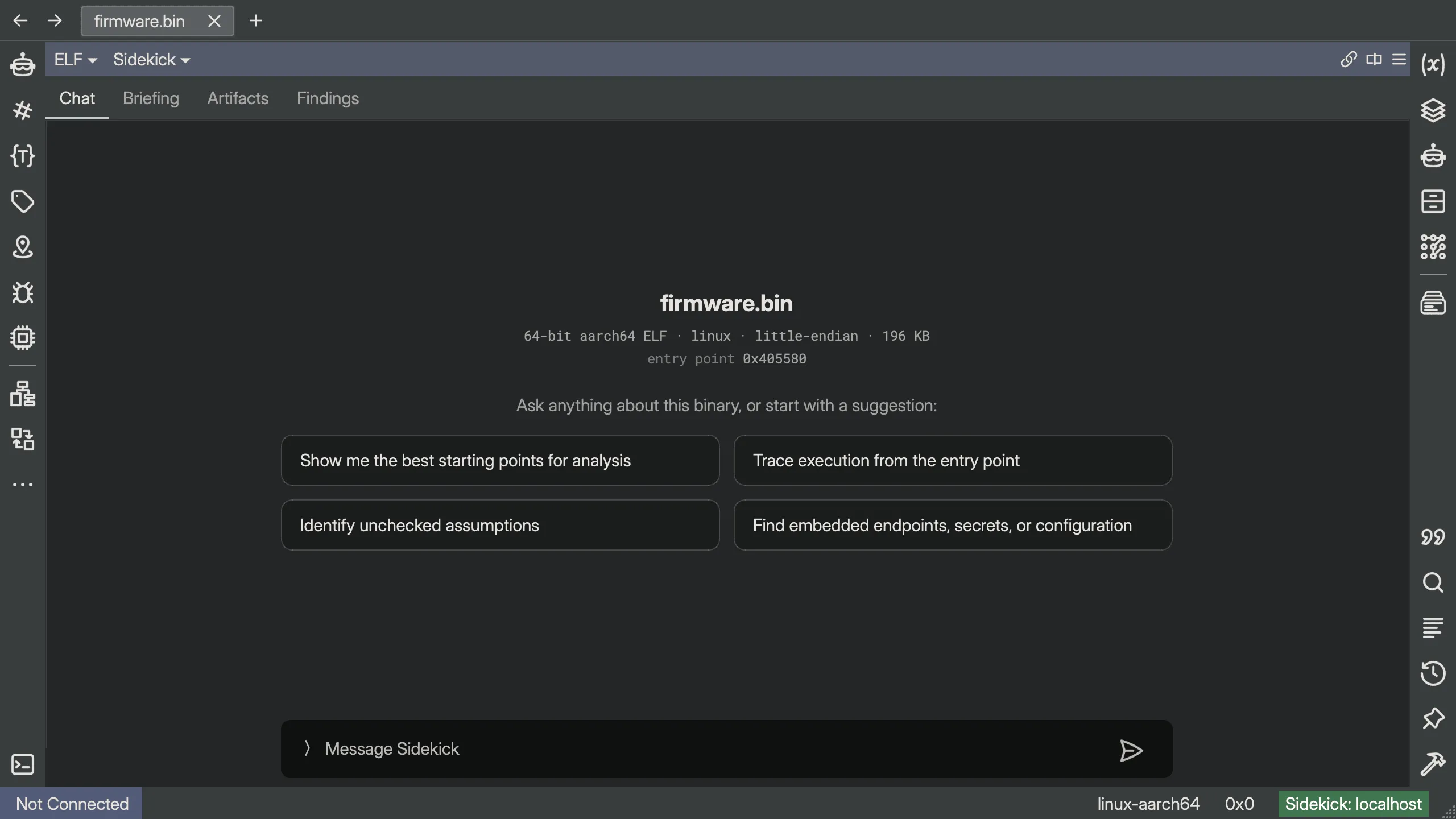
A proper home for Sidekick
Sidekick now sits alongside Linear Disassembly, Graph, Hex, and the IL views. With Prefer Sidekick View enabled (the default), it is the first view you see when you open a file.
As a center-pane view, Sidekick gets the screen space an AI-first reverse-engineering workflow needs. It no longer feels secondary; rather it feels like the natural starting point. In addition, there is more room for the conversation, the work in progress, and the analysis outcomes that you are most likely to come back to.
The Chat tab holds the workspace conversation. Its lead agent can delegate work to specialist agents, so that the main conversation reflects the overall analytic arc. Before the conversation begins, the tab shows a quick summary of the binary and a few questions you can send with a click. Once work is underway, a drawer above the conversation shows active notebook entries and anything currently blocked.
The other tabs put the most relevant outcomes of the analysis at your fingertips:
- Briefing is the running case file for the workspace.
- Findings collects the conclusions Sidekick has recorded.
- Artifacts collects generated output such as reports and YARA rules.
Those things used to be spread across various chats and sidebars. Now they are right there.
The lead agent is more succinct with links to recorded results (you don’t always need/want an entire book for an answer). Findings, artifacts, and database edits appear as evidence chips beneath a message. A single item opens directly; a group opens a picker. Citations and code references are still available, but they no longer have to interrupt every paragraph. The conversation stays shorter and points at detailed work.
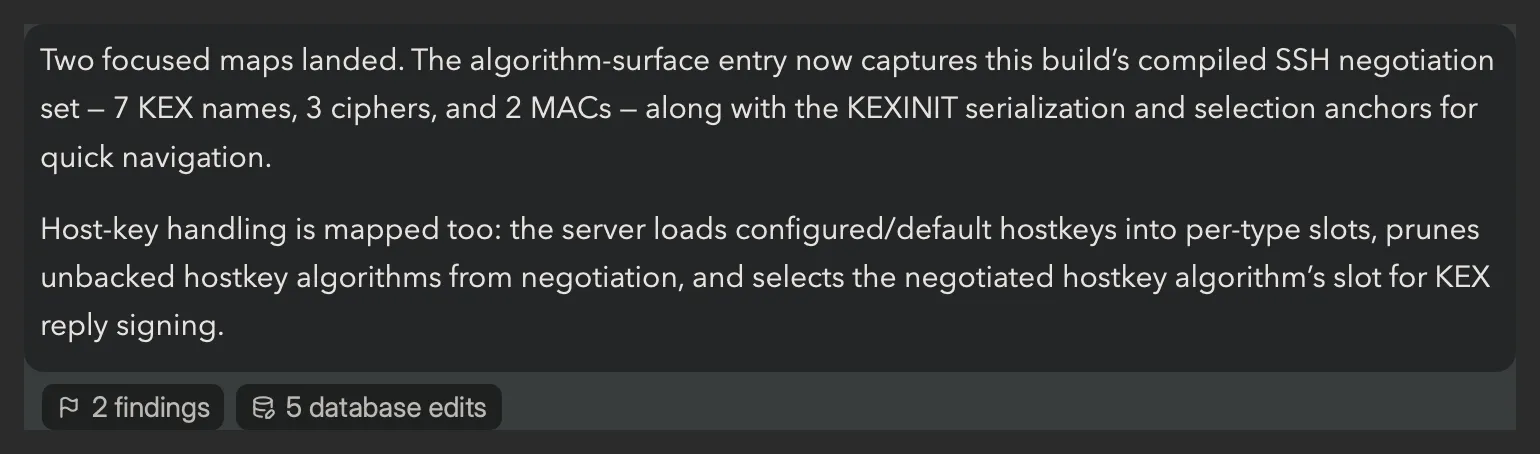
The existing Chats sidebar has not gone away. It’s still useful when you deliberately want isolated conversations or want to watch a delegated agent work. It’s just no longer the default starting point.
Seven sidebars were too many
Sidekick 26.0 had separate sidebars for Chat, Indexes, Notebook, Code Maps, Repositories, Transaction Log, and Library. It was too much to keep track of.
Indexes, notebooks, code maps, and repositories were already all resources in the Sidekick kernel. In 26.1, the UI matches that model. Those four sidebars have become one Sidekick Resources sidebar with a shared browser and detail view. Search covers all four resource types at once, including their contents, from one place.
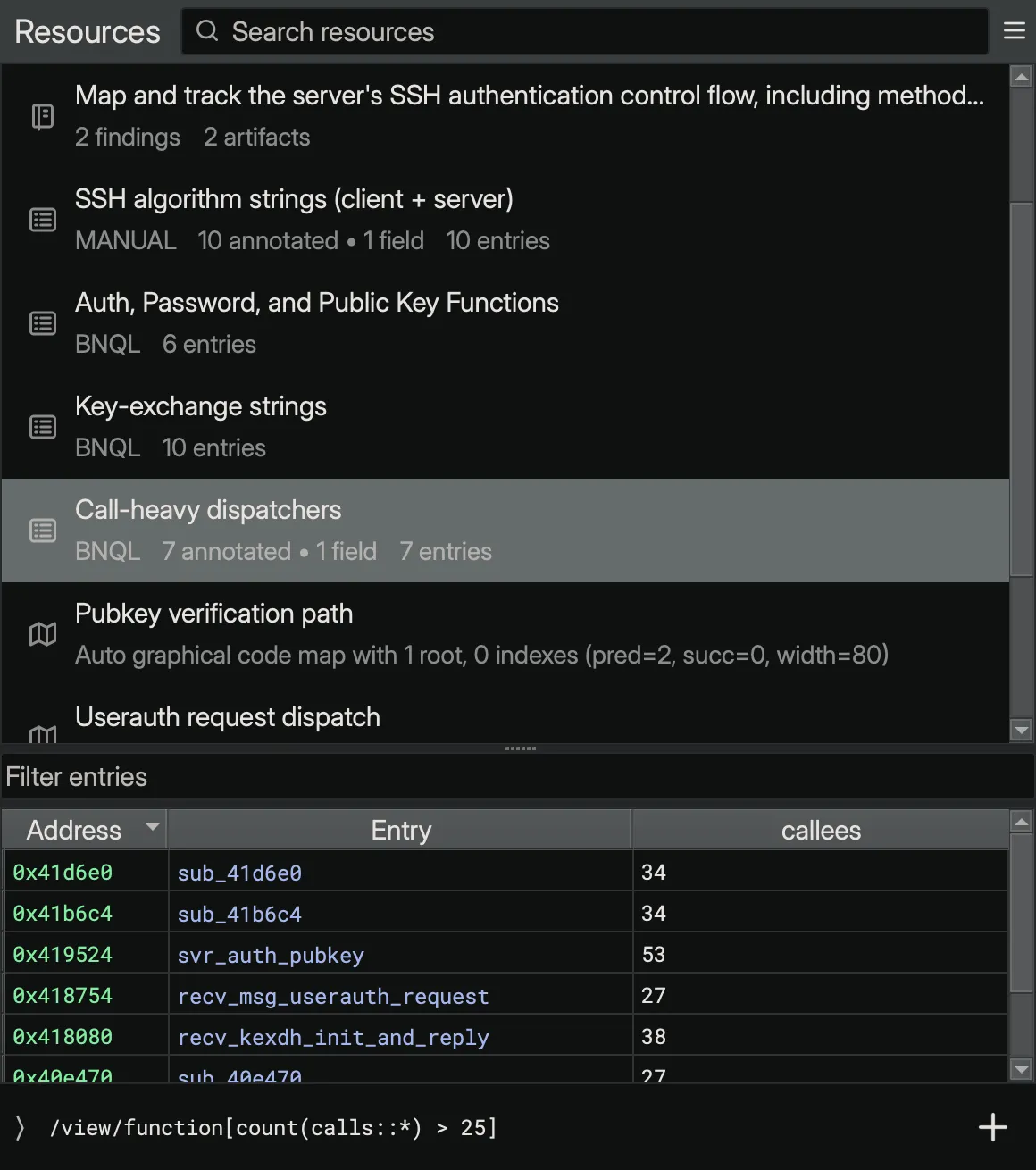
Bonus: any resource can be pinned into its own Binary Ninja pane. This is especially handy for a code map or index that you want to keep open beside a code view.
The Chat, Transaction Log, and Library sidebars remain separate.
Sidekick can use the terminal
We initially chose to confine out-of-the-box Sidekick to the Binary Ninja environment. That boundary has become less useful as models have become more capable and people have come to expect an agent to work with the files and tools around the main application.
The new run_terminal_command tool lets an agent run a shell command, using bash on macOS and Linux or
PowerShell on Windows, and read the output. It can unpack an archive, run binwalk on a firmware
image, inspect a git history, fetch a URL with curl, or examine a neighboring file that was
never loaded into Binary Ninja. (Obviously, you could have defined your own MCP server to expose the shell,
but now you can do it without any extra setup.)
This also gives an agent access to your machine, so the default permission is Ask. Every command includes a stated purpose and waits for your approval before it runs. Commands execute in a fresh, one-shot shell with an explicit working directory and a timeout.
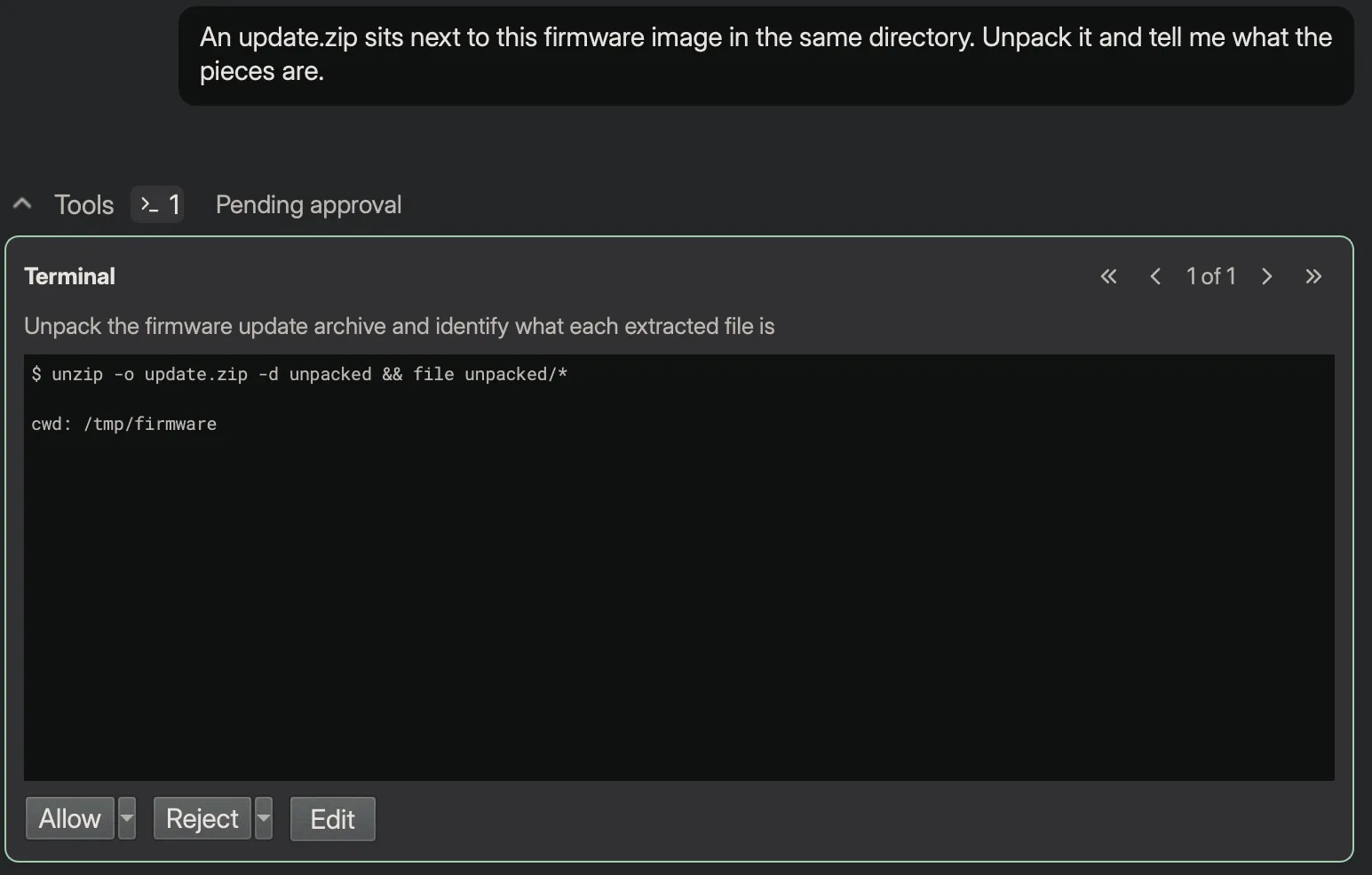
run_terminal_command lets an agent seamlessly combine terminal work with reading from or changing the BNDB,
which still go through query_database, python_eval, and update_database.
Revert, for when you need it
Hopefully you will not need the new Revert button very often. But, it’s there when you do.
One of the advantages Sidekick has over a generic MCP-based workflow is update_database. Instead
of making a trail of individual edits, it groups related database changes into one described transaction,
much like a small git commit. That makes it much easier to understand what an agent changed and why.
In 26.1, the transaction log shows those changes as a grouped diff: the old value on a red −
line and the new value on a green + line. Double-clicking an object header takes you to the
affected object.
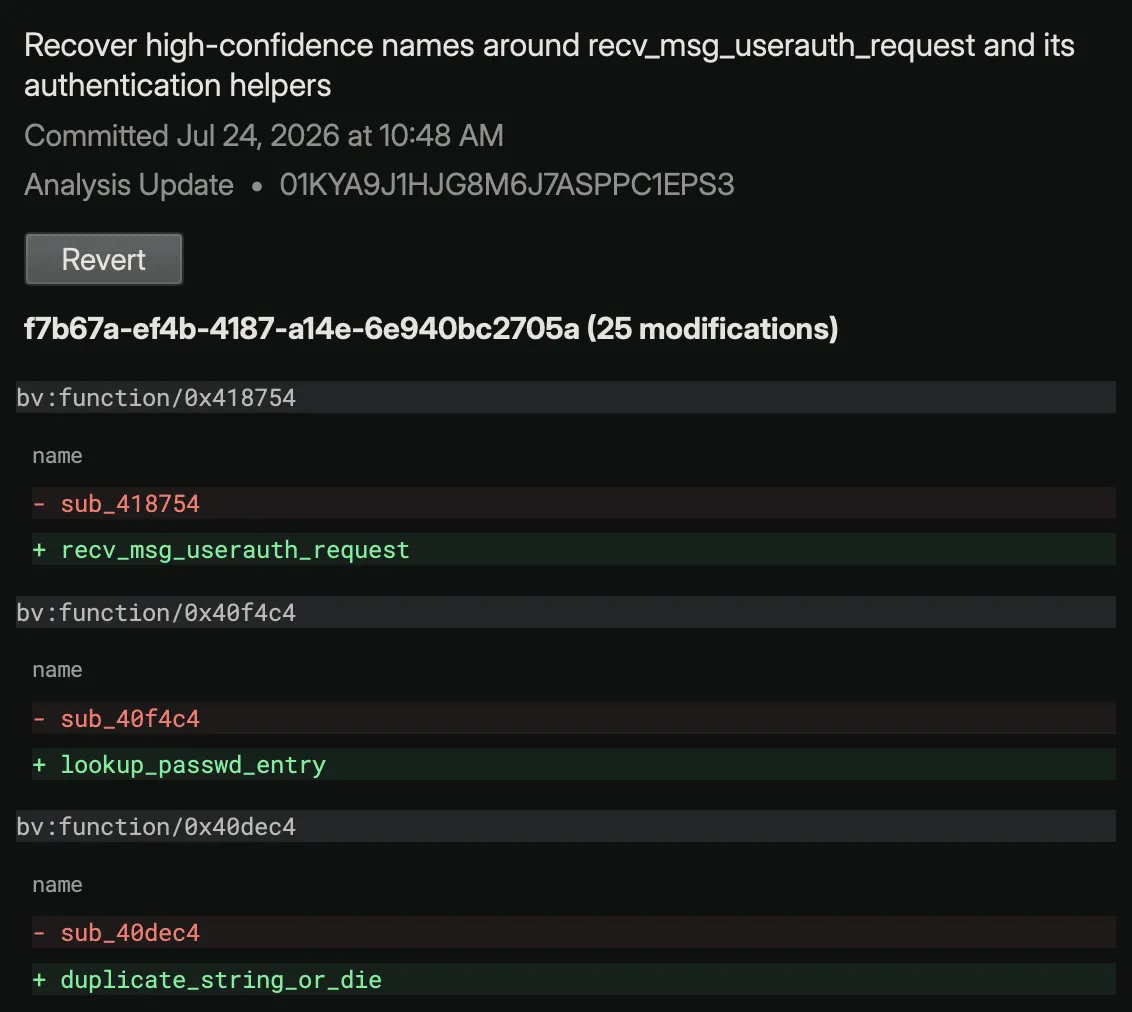
Revert is more flexible than an undo stack. You can revert any committed transaction, not just the most recent one, as long as the affected objects still match the state that transaction left behind. The inverse transaction goes through the ordinary apply pipeline and will decline rather than overwrite newer work. Renames made by the transaction are reversible too: Revert locates the variable or type under its new name and restores the old one. Rejected and failed transactions are also visible in the log with a badge showing their state.
The rest
/compactlets you compact the current conversation on your own schedule.- Blockers are notebook records, which lets the Sidekick view show them in its work queue.
- Notebook artifacts are repository files, so a generated report or YARA rule can be opened, exported, or passed to another tool.
- BNQL fixes cover segment and section containment traversal, data-variable token attributes, and reserved-word identifiers. Index tables also add a Binary column automatically when their entries span several binaries.
- Faster sidebars avoid work proportional to the size of the chat or transaction history.
- Lower first-response latency comes from adaptive routing across completion pools, including immediate failover when a provider is slow or unavailable.